All tools should now have two users
Our dev environment tool ran 2686 commands in 24 days and I typed almost none of them. What we learned building Dev Center for two users at once: the engineers in the app, and the agents at the CLI.
As of October 2026, dev tools are exploding everywhere. Every team is now capable of rolling out their own dev tools, and internal tools are being rolled out by any team, working however they want them to work. The friction to build such tools is super low, and with models like Opus 5.5 and GPT-6 around that can pretty much do anything, there isn’t a ceiling to what teams can do now. It’s all up to your imagination and how much you want to get out of these tools.
We have been building such tools as well ever since Claude Code first came out in February 2025. This post is about some of the things we have learned building tools for our engineering team, how we now approach all of our tools to get the maximum out of them, and how we make sure the adoption is right by allowing agents to use these tools as effectively as possible, with as little teaching as possible.
In last 3 weeks our developer environment tool ran 2686 commands on my system and I typed almost none of them. Claude Code ran 2091, Pi ran 595, and Courage, our Slack agent (more on it in a separate post in the coming weeks ;) ), ran another 142 on its own machine. The commands these various agents were running were logs (551), status (332), send (230) and run (203), which is roughly what you’d hope an engineer would do: look around first, then type into a terminal. And that’s the future. Agents will take over more and more of things and whatever your team and your building needs to be equally visible to agents as to humans or maybe I will say more agent friendly than humans so that the agents can get the most out of them.
That tool is Dev Center, and we built it for two kinds of users from the very beginning. Engineers get a native app(MacOS/Linux) with every service in a live terminal, and agents get a CLI that can do everything the app can, through the same code. Getting there wasn’t easy, it took us three attempts and a lot of learnings/failures and each one taught us something about building tools for this second user. The goal for us to have something that allows agents to run our various stacks with minimal number of steps and without ever running into problems if several of them were running together and being able to run and embed this anywhere.
local-ci-runner was also built from the same principles that we apply to Dev Center. We are running it on pretty much every project that we have internally, we have completely removed third-party CI from our system apart from the actual deployments, and our CI cost has gone down to pretty much zero due to it.
This is what Dev Center looks like today.

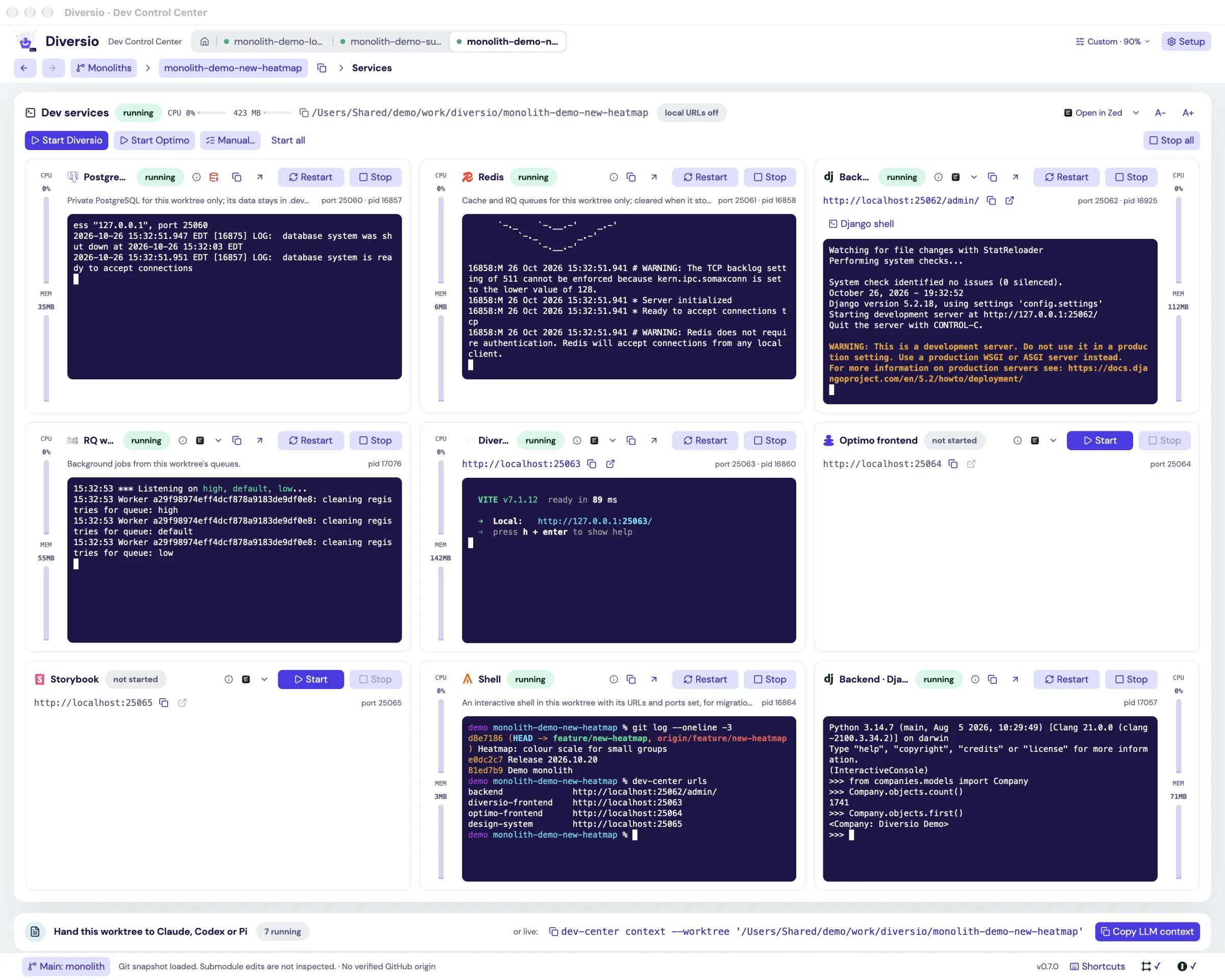
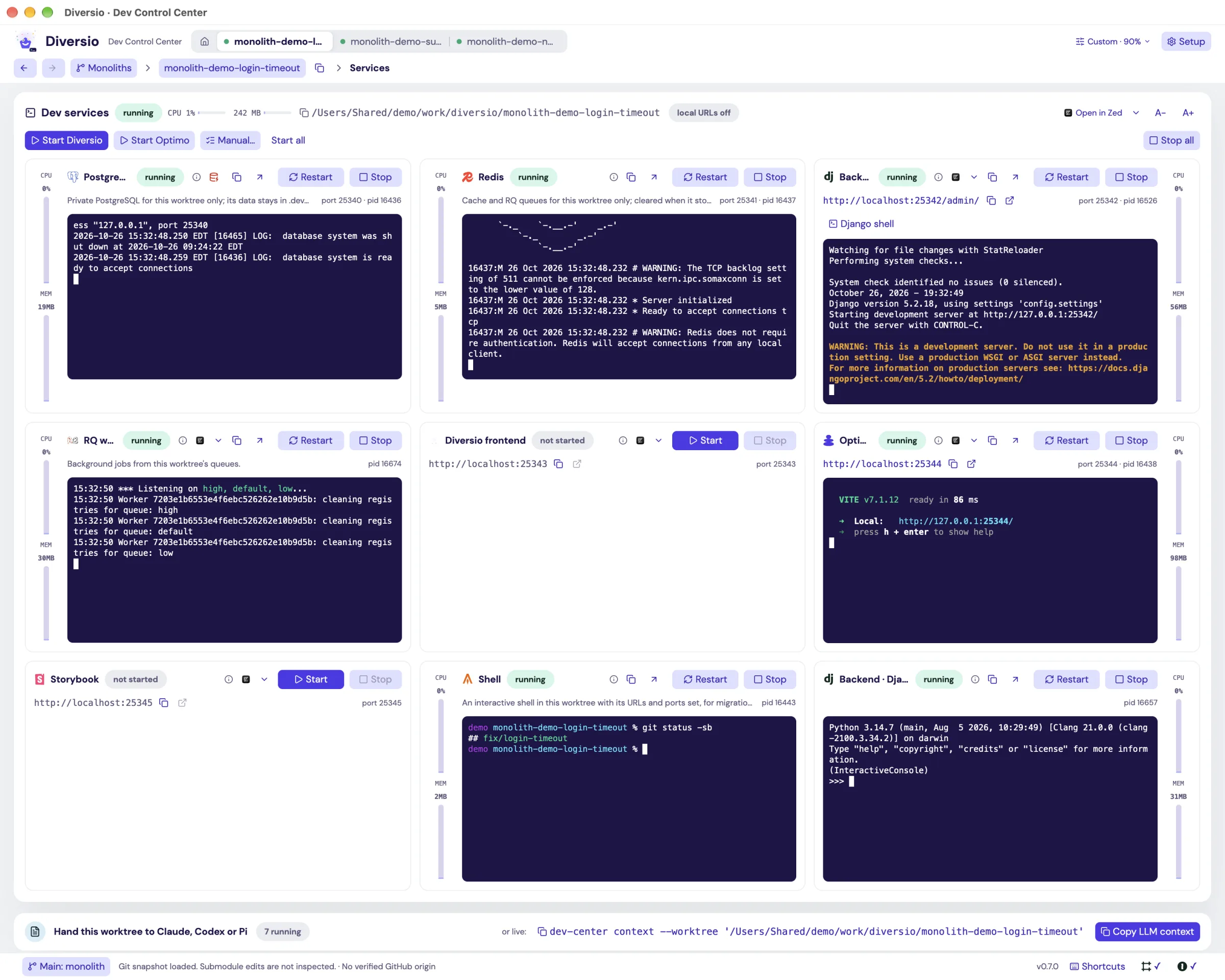
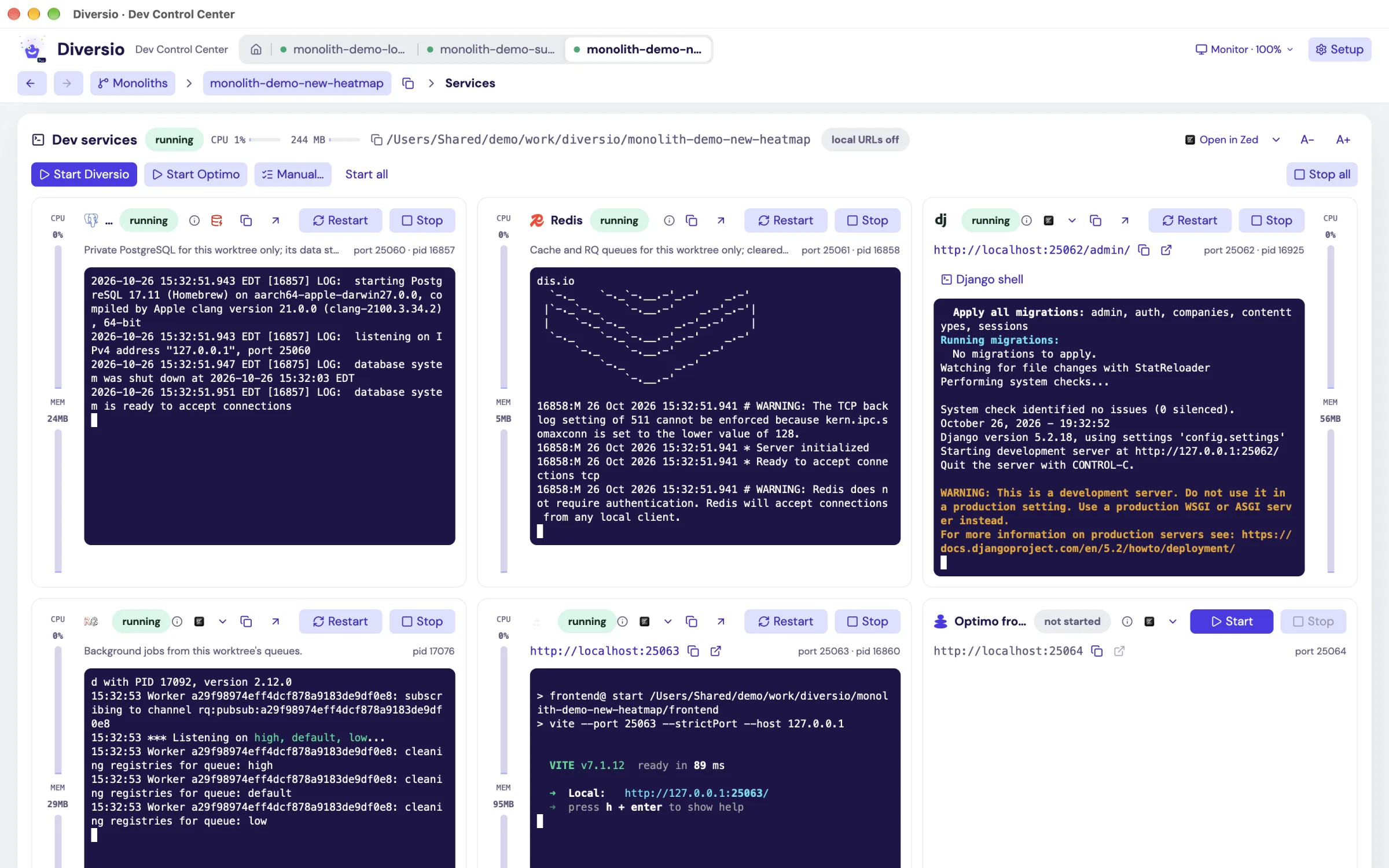
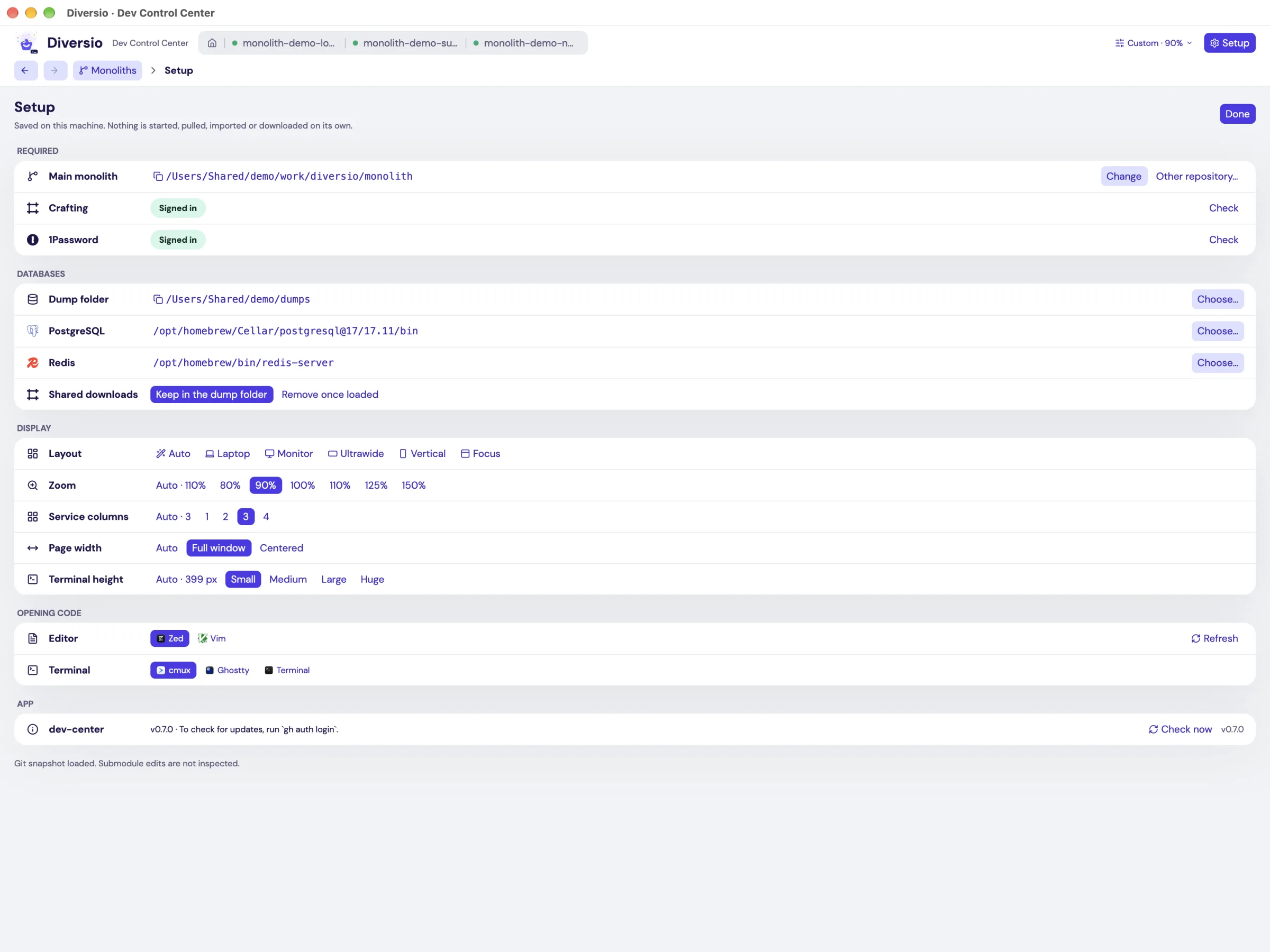
dev-center setup shows the same.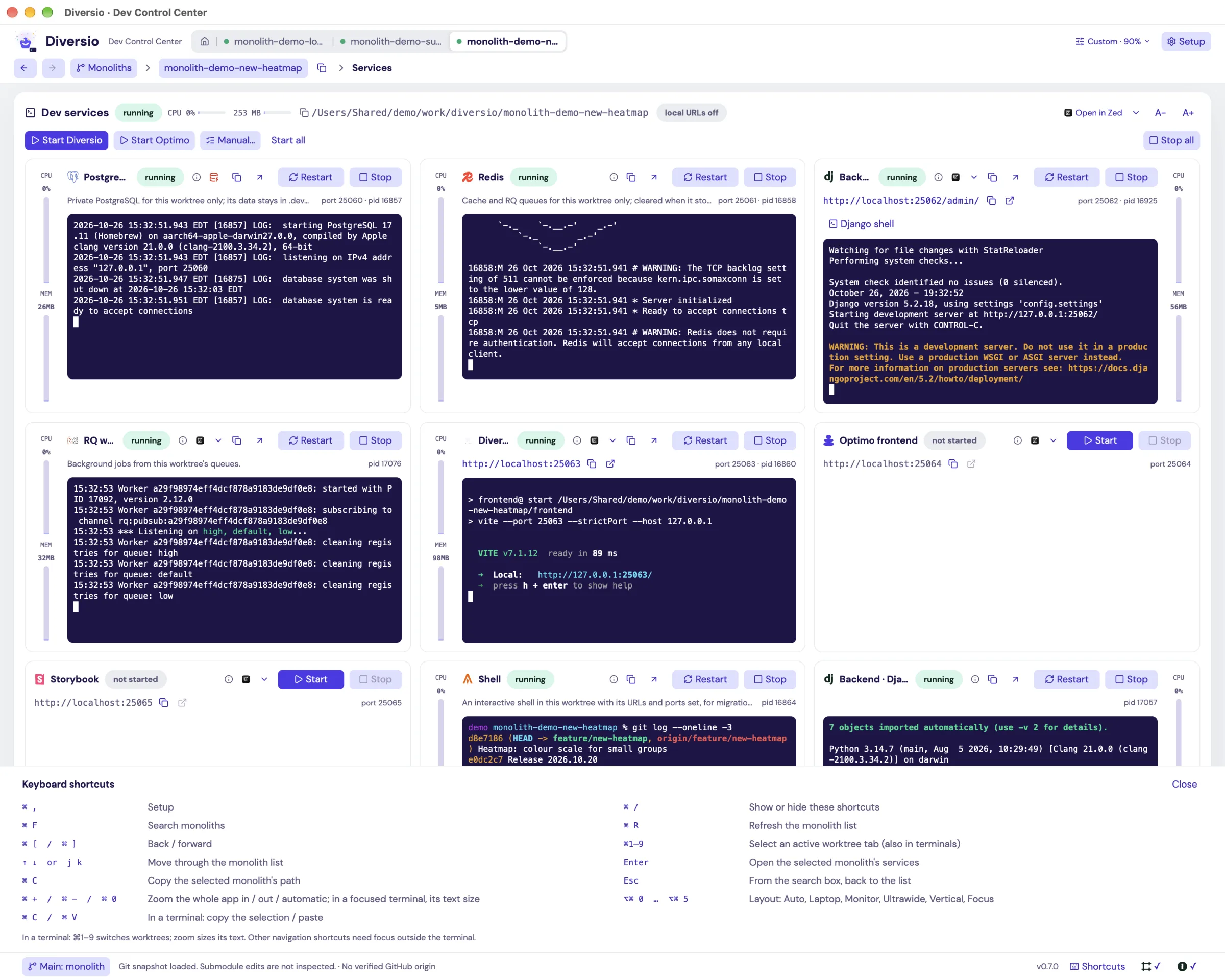
Spinning up multiple instances of the app locally was always a problem#
Until February 2026, running our app locally meant doing all of this:
- having correct
.envfiles with correct values for backend, multiple frontends, design system etc - backend would run on port 8000, the frontends would run on port 3000 and 3001
- design system would run on port 6000
- Redis on port 6379 and Postgres on 6432
- ensuring all of them knew where to point to, the frontends need to know where the backend is running and backend needs to know which postgres DB and Redis instance/DB to connect to
It works fine for one copy. The trouble starts the moment you need a second one for a PR review, or a third for yesterday’s bug and one for a feature you’re working on. And this is a problem for agents too. Agents will find a port is busy, and they will either try to kill it or try to spin up something on a different port, but they wouldn’t care about how it affects the frontend or whether the frontend is even talking to the thing they just spun up. You can document everything in your prompts, repeat yourself all the time or have it documented in AGENTS.md, but it was simply getting out of hand to manage this as humans, as well as making sure agents follow your instructions all the time.
So, here is that re-enactment of the second copy, recreated on a throwaway Postgres with a small synthetic dump and a bare Django project. The commands and output are real; the dump restore fails on a role that only exists in production, the second runserver hits a port that’s already taken, and you end up running lsof to remember which port is which.

I walked through the full version step by step to estimate what it costs. Only one line here is measured, the rest are honest estimates:
| Step, per extra worktree | By hand |
|---|---|
| Worktree plus about 20 submodules on the right branches | 5-10 min |
Copy .env files, pick unused ports, point the frontend at the new backend, and remember all of it | 10-15 min |
Find, download and decrypt the latest dump, then createdb with a unique name | 5-10 min |
Restore it (measured on our real dump: plain psql took 69 s) | 5-15 min |
| Migrate, collect static files, start four processes in four terminals | 5-8 min |
Notice the frontend still points at the old backend, or .env at the old database | 2-10 min |
| Total | 30-70 min of attention |
| Every time the shared dump is refreshed, per worktree | about 10 min |
The minutes were annoying, but the bigger cost was that every step needed someone’s memory. An agent can’t remember that port 8001 is the review copy, so it simply couldn’t do this work at all. And as humans remembering these ports and making sure everything is connected to what it is supposed to be what was nightmare.
So we wrote a script making use of just, and the script turned out to be much better than anyone expected.
What just dev got right#
just dev landed on February 17 as a single 6,737-line commit, and for eight months it was honestly a good tool. One command replaced the README:
- Guided setup.
just dev configchecked which tools you had, read your shell history for the commands you already used, and walked you through each setting. - Three modes from one CLI. tmux panes you could watch live, a headless mode for scripts, and from February 27 a Docker mode with its own Compose stack.
- A control center. From March 2, an
fzfpicker listed every worktree with its tmux, host and Docker state. Function keys ran actions (F2 tmux, F3 headless, F4 Docker, F5 stop) and number keys copied URLs. - Fixes for the problems we kept hitting. Busy ports moved automatically,
*.localhostnames replaced port numbers, and the Docker health check learned to wait for a database dump restore.

just dev config, from the last version before it was retired, re-run from a scratch clone with an empty home folder.


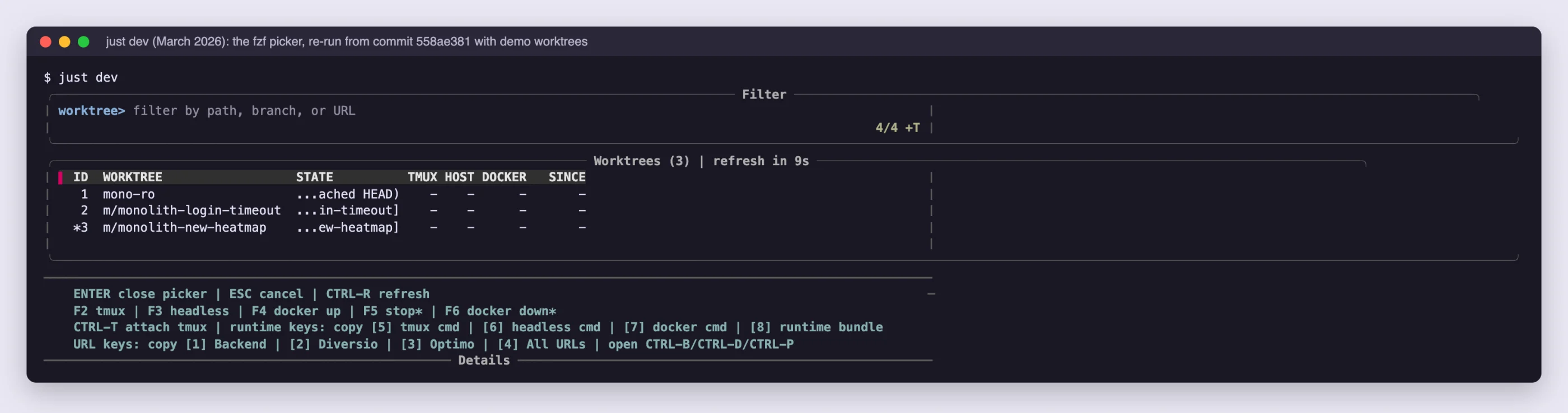
We kept it alive along the way. Aryaman Chandra fixed the frontend’s API root so local API calls stopped returning 404, and Ashish built a per-user cache of bare git mirrors that made submodule setup lightning fast. Dev Center’s create still uses that cache today.
Alongside just dev, we were also creating a lot of worktrees, and cleaning them up properly was its own problem. So I also built wt, a small fzf dashboard for git worktrees, which we were using as well. It made deleting worktrees safe and complete end to end: a plain confirmation for clean ones, typing delete for dirty ones after showing what would be lost, a re-check right before deleting in case something changed in between, and pruning stale git metadata and leftover folders so nothing was left behind. Dev Center learned from that and made it a first-class feature within itself.
The lesson I learned from this phase was that one command that encodes the team’s know-how beats any README, and this is true for both people and agents.
There was one more problem hiding in those .env files, though, and it got worse the more agents we added. And given how sophisticated cyber security and supply chain attacks are getting it was a much needed one.
Secrets had to leave the .env file first#
In September, secrets left the shared .env files for good. The repository now holds op:// references, and a small launcher knows how to hand them to op run when a process starts, so the values only ever exist inside that process. tmux needed its own 1Password session sync to keep up. Dev Center reads the same references from the repository, resolves them itself, and never prints a value.

When an agent is the one starting your processes, this matters a lot more than it used to. Nothing secret sits on disk, rotating a key doesn’t mean re-sending files to everyone, and the agent never sees a raw value anymore.
Where just dev ran out of road#
just dev was built for one person at one screen. Its state lived in tmux panes, container logs and PID files, and its best interface was a picker driven by function keys. Engineers could read all of that. Agents mostly couldn’t - they started duplicate stacks, missed failures in a pane nobody was watching, and asked us what was running.
It also kept collecting fixes. Here are eight months of local-dev PRs, straight from the repository:

State that lives in panes and PID files is visible to whoever is sitting at that screen, and nobody else.
And honestly, the effort that went into just keeping it running was a lot. Over eight months we made 49 commits across 34 PRs only to keep it alive, and 13 of those went into Docker mode alone, fixing a bunch of issues with stale images, port collisions, databases not being ready and F4 failing in ways nobody could make sense of. Here is what we tried along the way and eventually dropped:
- Docker mode. We built it in February, kept reworking it through June and July, and it ended up being the part of
just devwe fixed the most. Dev Center doesn’t touch Docker at all. - Better Docker output and dump selection. We closed it without merging.
- Watching Docker containers and their logs from a GUI. I asked for it, and it never got built.
And it’s also worth pointing out that even though we had just dev in place, engineers were still spinning up their own versions of it that worked really well for them. Someone was running or managing their stacks from IntelliJ or VS Code, someone spun up their own version of just dev with a separate Bash script.
So there was nothing that we were consistently following, and they were also running into the same issues that just dev was trying to solve. And being easy to use for humans and agents alike was not something I intentionally had in mind when I was creating it.
I think it had a good run, but the adoption simply wasn’t there and it simply wasn’t helping us out, at least not all of us. And ultimately I think it just wasn’t the right tool.
Even the initial version of Dev Center got thrown away. On September 26 I planned a Rust GUI that sat on top of tmux and Docker, with just dev still being the source of truth, and there was an 18-task plan behind it. Five days later I threw it out.
So on October 1st I started over, with these items on my list.
-
One binary, two interfaces. A single dev-center binary that is both a desktop app and a full CLI, on macOS (Apple Silicon) and Linux (Arch, Ubuntu), installed and updated from GitHub releases.
-
Full parity between app and CLI. Every action in the app has a CLI command that calls the same code, every data command has
--json, and a new feature isn’t allowed to be ship without its command. -
Isolated worktrees. Each monolith worktree gets its own PostgreSQL database, Redis, port block and *.localhost URLs, and its frontends talk only to its own backend.
-
Worktree lifecycle. Create a worktree from the main checkout (with all submodules), update main from upstream, see the storage each one uses, and delete one safely behind a review and a typed confirmation, leaving no traces behind, the way
wtdid. -
One-click profiles. “Start Diversio” and “Start Optimo” bring up the right services in order: database load, collectstatic and migrations on first start, migrations only on restart, and workers that wait for their dependencies.
-
Data from shared dumps. Download the latest encrypted binary dump from Crafting, the cloud sandbox platform we use for previews and testing (in parallel with creating the worktree, with progress and ETA), restore it fast, and reset or replace a worktree’s database in one action.
-
Secrets from 1Password only. Secrets are injected at start from 1Password, never written to files, and never printed in any output an agent or person can read.
-
Real terminals in the app. Every service, Django shell and management shell runs in an embedded terminal you can type in, copy from, scroll back in and pop out into its own window, with CPU and memory shown per service.
-
Built for agents. The tool describes itself at every level (—help, manual, context), one button and one command give an LLM the full picture of a worktree, and there is exactly one app per developer that every CLI call talks to.
-
Embeddable anywhere. It should run in headless mode on my own system if needed, on a Linux machine, on any machine an agent has access to, and in any sandbox environment we use, out of the box.
-
Runs anywhere, shares safely. A headless mode for servers, public preview hostnames behind a sign-in, a small CPU and memory footprint, and a constraints document that keeps all of the above true.
The result#
Dev Center is currently a single 26 MB Rust binary. Run it with no arguments and you get a native app. Run it with a command and you get a CLI that talks to that app over a local socket. The app owns every process, and the CLI never starts one itself.
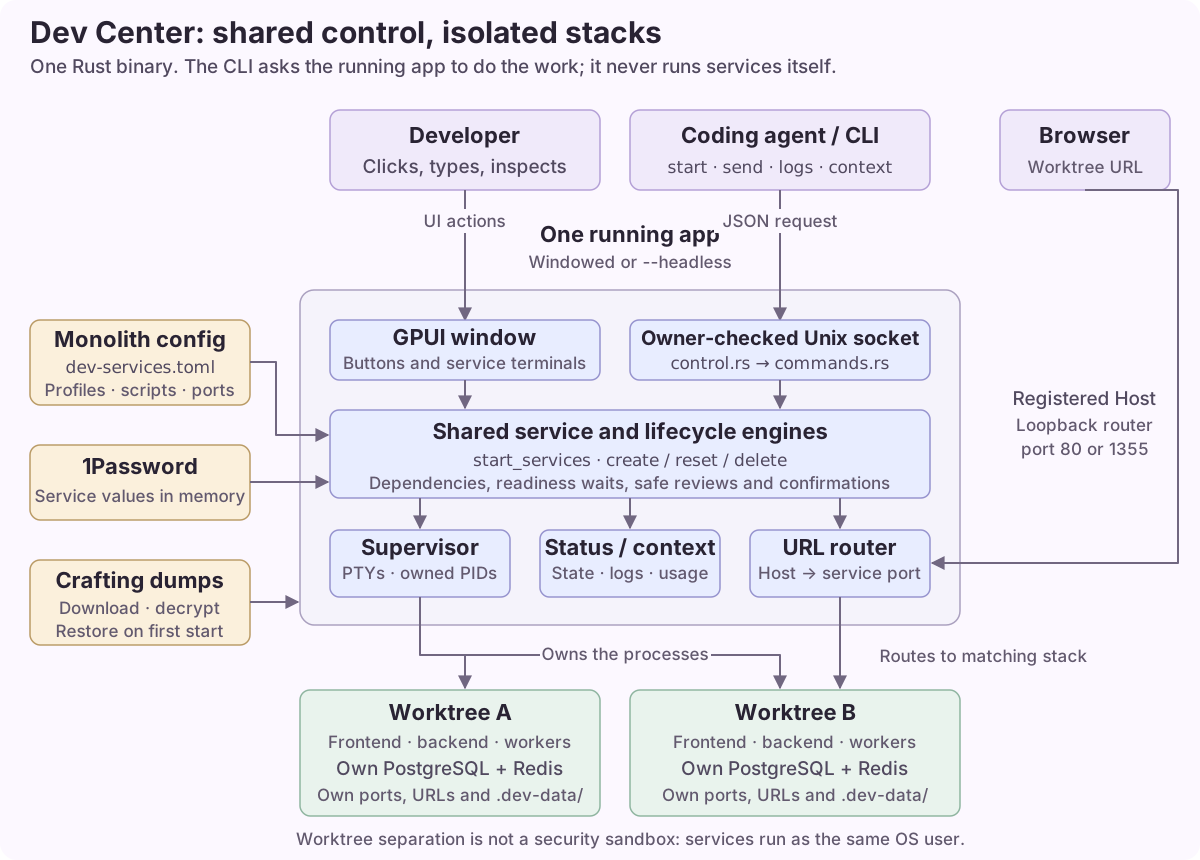
C-CLI-1 Everything the app does, the CLI does: same change, same engine function. No app-only features.
We enforce it in the code rather than by good intentions:
- Each feature is an engine module with a thin app flow on top.
create.rsis the engine andcreating.rsis the app flow, andremove.rs/removing.rsanddumps.rs/dumping.rsfollow the same split. The CLI calls the same engine. - Live actions share one path. The Start buttons and
dev-center startboth callstart_services. The “Copy LLM context” button anddev-center contextboth callstatus::build_context, and when I diffed their output the only differences were the live CPU and memory numbers. - Tests guard the contract.
every_command_is_in_the_manualfails the build if a command is missing from the manual embedded in the binary, and another test checks that an app with no window still answers every command. - Gaps get closed. When we found four app features without a command, one PR added them: terminal text size, sign-in, restart after update, and cleaning up a failed create.
| In the app | In the CLI |
|---|---|
| Monoliths list | worktrees |
| New worktree form | create (with --dry-run) |
| Start, Stop, Restart | start, stop, restart (with --wait) |
| A terminal’s output | logs |
| Typing into a terminal | send ... --enter |
Django shell, manage.py | start backend/django-shell, run manage -- ... |
| CPU, memory, ports, URLs | status, urls (with --json) |
| Copy LLM context | context |
| Shared dumps, Download & use | database --shared, --shared-dump |
| Replace a broken database | database --reset --confirm RESET |
| Delete this worktree | delete, then --confirm DELETE |
| Tabs, Setup, layout, Open in editor | tabs, setup, display, open |
| Pop a terminal out into its own window | No command, since it only changes windows. logs and send reach the same terminal either way. |
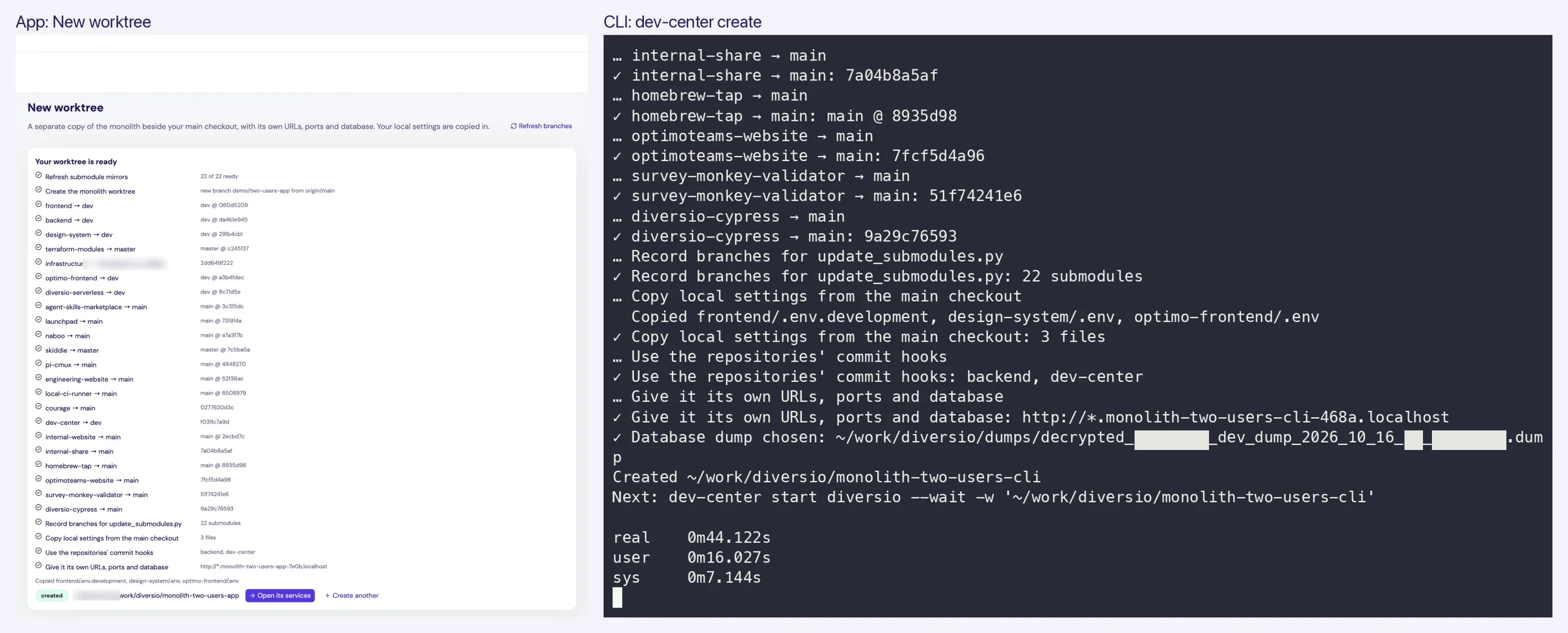
dev-center create on the right.
My favourite one below is two recordings taken at the same moment and stacked. On top, an agent types dev-center send and dev-center run. Below, the app shows the agent’s Django query landing in the Django shell’s box, and manage.py getting a new terminal box of its own.
Nothing happens behind your back. You can watch whatever the agent is doing, scroll back through it, or type into the same terminal yourself.
What each user actually gets#
For the person at the keyboard, the app gives you actual live Alacritty terminals, CPU and memory for every service, layout presets for different screens, terminals that pop out into their own window, and a delete review that lists unsaved work in every repository before it makes you type DELETE.
send still reaches it.For the agent, the CLI gives you:
context: what’s running, what failed, recent output, and the exact commands to fix it for this worktreemanual: the full reference, embedded in the binary and matched to its version, with an opening section written for LLMshelpat every level and--jsonon every command that reports data- exit codes 0, 1 or 2, and errors that name the next command to run

dev-center context produce the same brief.The parity pays off most when nobody is at the keyboard. The same binary runs headless on a Mac nobody logs in to, and there Courage uses only the CLI: it creates a stack for a pull request, restores the shared dump, and hands back a preview link that anyone at Diversio can open after a Google sign-in. Previews run on the dev dump, never on production data.
Now the obvious question: does any of this work when nobody tells the agent how to use it?
What agents did with no instructions#
Dev Center is three weeks old and it is private so no model has seen it in training. I went through every agent session on my system and Courage’s history. Of the 64 sessions that ran dev-center, 29 were “cold” - nobody told the agent which commands to use, and until October 20 our AGENTS.md only linked to a setup guide. Within those 29:
- The first move was discovery. In 23 of them, the first command was
--help,help <command>,manual,contextorversion. - They got there. 24 of the 25 that changed something ended up with a working worktree or a running stack. The one miss was a secret missing from the environment, not a misuse of the tool.
- They didn’t take long. The median was 4 commands before the first change, compared with 1 for sessions that were told exactly what to run.
- They checked before acting. 13 of the 22 that created a worktree ran
create --dry-runfirst, becausehelp createsuggests it. - Courage behaves the same way, even though its system prompt mentions Dev Center. It opened with a discovery command in 7 of its 14 conversations and read the manual early in 11.

--help, help database, then the manual.Here are two real sessions from October 2, replayed today with the same commands. A Pi agent ran seven read-only commands before changing anything. A Claude Code agent, asked only for “a clean worktree … using dev-center”, created one and later deleted it after reading the review.


When an agent did go wrong, the error usually named the fix. One run from the wrong folder was told “see dev-center worktrees”, and that was its very next command. The one early failure the errors didn’t cover was an agent starting a second copy of the app, and we fixed it with a single sentence in the context every agent reads: “Exactly one app runs per developer.”
Why man was never going to cover this#
man works well for programs whose whole interface is flags, and it breaks down for nested subcommands. man gh pr prints gh(1) and then pr(1), the old Unix “print files” utility. gh pr --help is excellent, but no help text knows about your machine: which worktree you’re in, what’s running, what just failed. Agents need both kinds of answer, which is why Dev Center has manual and help for the reference and context for right now.

man gh pr, man gh-pr, and gh pr --help.
dev-center manual, embedded in the binary.The guards have to live in the tool#
When two kinds of users share a tool, you can’t rely on either of them remembering the rules:
- Read commands are listed as safe, including
status,context,urls,logsandcreate --dry-run. - Destructive commands report before they act.
deletewithout--confirm DELETEonly prints what would be lost, anddatabase --resetalso needs--confirm RESETplus an explicit choice between--keep-copyand--discard. The app asks the same questions in the same words. - Nothing secret in output. Honestly, I found an edge case here while writing this post:
contextincluded a finished console’s output, and that output held a one-time login link (already used). The fix is in progress while this post is being written, and it was a good reminder that “the agent sees what the person sees” cuts both ways.

What it changed for the team#
Dev Center is three weeks old, and most of its use so far is agents working for a few of us, so take these numbers as directional:
- Who uses it. Two people have committed to Dev Center itself: me, and Ashish, who built worktree tabs and service alerts. Courage runs Dev Center stacks in conversations started by different people in Slack.
- How much it runs. In 24 days, agents made 2,686
dev-centercalls on my laptop and Courage made 142 more. They created about 39 real worktrees on the laptop and about 14 on Courage’s Mac, which works out to roughly 15 new stacks a week. - Parallel work. My laptop holds 35 monolith worktrees, each with its own database, ports and URLs. Two at once used to be a chore.
Measured on an M4 Pro MacBook on October 24, using throwaway worktrees I deleted afterwards:
| What | Time |
|---|---|
create with 22 submodules and a shared dump | 44 s with the dump on disk, 52 s with a 321 MB download |
| First start: restore, migrate, backend, worker, frontend | 1 min 46 s to 1 min 54 s |
| Later starts (mostly Django booting twice) | 44 s |
| Database reset with a fresh reload | 85 s |
| Delete, including the 2.8 GB database | 26-28 s |
status and context | about 0.1 s |
start diversio --wait from the CLI, and the same start in the app. A small demo stack, so it's quick.A settled stack uses about 500 MB of memory and the app itself about 104 MB.
To estimate the time saved, I assumed about 15 new stacks a week, each costing the 30 to 70 minutes of attention from the manual table, against about a minute of a person’s time with Dev Center (asking, then checking). That comes to roughly 7 to 17 hours of attention a week, before counting dump refreshes. In practice most of that saving shows up as work we simply wouldn’t have attempted before: a stack per PR review, a stack per Sentry investigation, a preview link for a support question.
How to build tools for two users#
If you’re building internal tools today, here is what I’d take from all of this:
- One owner of state, many views. Put every action in an engine and keep the app and the CLI thin. Write the rule down and then test it.
- Make the CLI explain itself. Help at every level, and a manual inside the binary with a section addressed to LLMs. Fail the build if a command is missing from it.
- Ship a
contextcommand. One call should inform the agent what’s running, what’s broken and what to type next on this machine, with no secrets. Put the same output behind a button for people too. - Use consistent verbs and forgiving names.
start,stop,logs,runandsendwork the same everywhere, and an unknown name lists the ones that exist. - Output for machines too.
--json, a versioned schema, three exit codes, and errors that name the next command. - Make safe things obviously safe and dangerous things slow. Typed confirmations, explicit choices about data, and
--dry-run. - Let people watch the agent. When an agent’s actions show up in the terminals a person is already looking at, trust comes much faster.
- Fix behaviour in the text the agent reads. A lot of times the cheapest guard is a single sentence.
- Keep secrets out of files and output. Resolve references at the very start, so neither people nor agents ever handle raw values.
The next thing for us is getting the rest of the team onto Dev Center through Courage and seeing which of these hold up with more than a handful of people. I’ll write up what we learn.
Dev Center now runs on every developer’s own machine, on macOS and Linux (Arch Linux and Ubuntu), headless on Courage’s Mac, and in our Crafting sandboxes.
Related reading#
AI writing disclaimer
- I pulled the usage numbers, and how Dev Center was being used, from our agent session logs using Claude Opus 5.5.
- The terminal recordings, screenshots and screencasts were also made with Claude Code, on throwaway worktrees, so none of our internal code or data is exposed.

Written by Ashwini Chaudhary
Software engineer, writer, and photographer.
Comments